Some clients don't pay sales tax: businesses buying for resale, nonprofits and government buyers. Add their exemption certificate to their client profile once, and their projects in the states it covers aren't taxed while it is valid.
Where to find it: Click Clients in the left menu, open the client and find the Sales tax card. On a phone, tap the menu icon at the top left first to open the menu.
Before you start: turn on sales tax and add your states first. See Set up sales tax.
In this article
- How exemptions work
- Add a certificate
- Change or remove a certificate
- When a certificate expires
- See your tax-exempt clients
- Troubleshooting
- Related articles
How exemptions work
The Sales tax card on the client's profile shows their status: Not exempt, "Exempt in NJ, NY until [date]", or "Expired [date]".
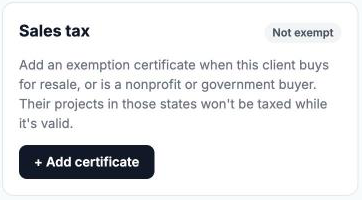
- While the certificate is valid, the client's projects in the states it covers have no tax. The project's Sales Tax window shows "Tax exempt: client certificate".
- Draft projects update straight away. Projects already sent or paid keep the tax they had.
- The card lists the client's Exempt projects with the reason and amount.
- Exempt payments appear in Exempt sales on your Tax Reporting tab, with the certificate type and number.
- Certificates apply to projects only. Photo store purchases are still taxed where they normally would be.
Add a certificate
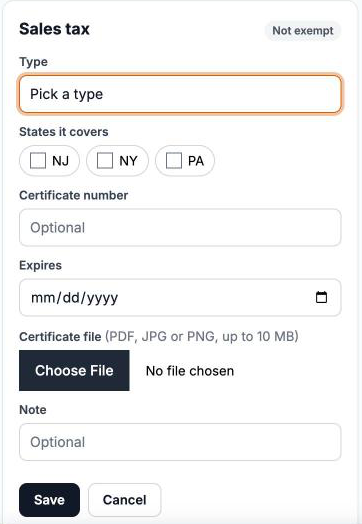
- On the client's profile, in the Sales tax card, click + Add certificate.
- Choose the Type: Resale certificate, Nonprofit, Government or Other.
- Tick the States it covers. Only the states where you collect are listed.
- Add the Certificate number and the date it Expires (both optional).
- Upload the Certificate file: a PDF, JPG or PNG up to 10 MB (optional, but recommended).
- Add a Note if you like, and click Save. You will see "Exemption certificate saved."
Only you can open the file. Keep the certificate for your records: states can ask for it in an audit.
Change or remove a certificate
- Each client has one certificate. Saving a new one replaces the old one, for example when they send you a renewed certificate.
- To remove it, click Remove and then Remove? to confirm. You will see "Certificate removed: this client is taxed again." Their draft projects are taxed again.
When a certificate expires
A certificate counts as expired the day after its expiry date. From then on, the client is taxed again on new and draft projects, and the card says "Expired: their projects are taxed again until you add the new certificate."
Good to know: RebookMedia doesn't send expiry reminders. The card shows "expires [date]" in the last 30 days, so ask your client for the new certificate in good time.
See your tax-exempt clients
Settings > Sales Tax lists all your Tax-exempt clients, each marked Valid to, Expires, Expired or No expiry.
Troubleshooting
"You don't collect sales tax in any state yet."
Turn on Collect sales tax in Settings > Sales Tax first.
"Pick at least one state the certificate covers."
Tick the states listed on the certificate.
"That file doesn't look like a real PDF/JPG/PNG."
Save or scan the certificate again as a PDF, JPG or PNG, and upload it again.
The client's project is still taxed
- Check that the certificate covers the project's state and hasn't expired.
- If an invoice was already sent or a payment came in, the project's tax is locked.
Still stuck? Book a free 30-minute call with our support team and we will walk through it with you.